Contract redlines represent one of the most fundamental tools in legal practice, yet many business professionals struggle to use them effectively. Understanding the redlining process can dramatically speed up negotiations, reduce misunderstandings, and create a clear record of proposed changes between parties.
What Contract Redlining Means in Legal Practice
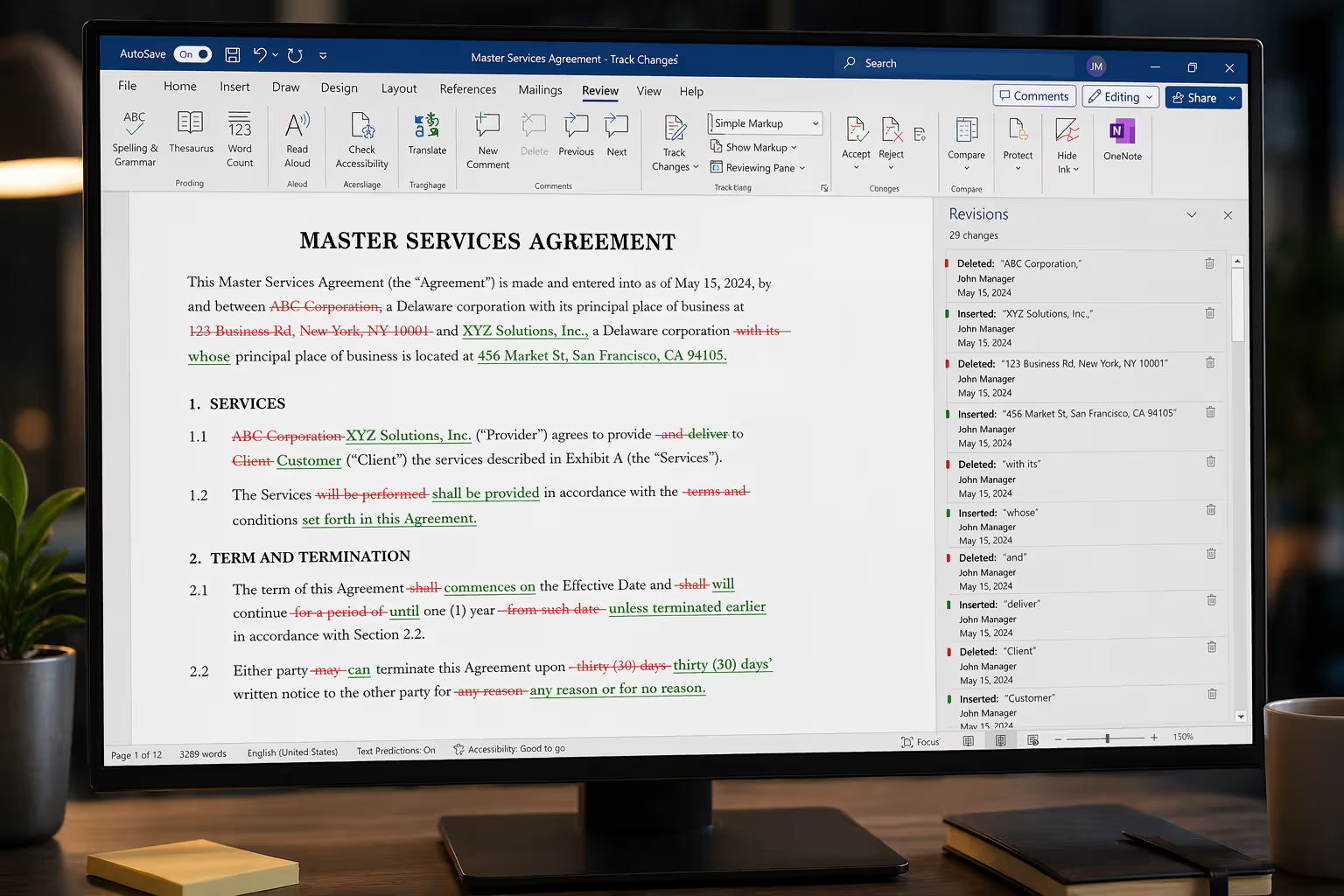
The redline contract meaning refers to a document markup method that visually displays proposed changes to an agreement. When you redline a contract, deletions typically appear as strikethrough text while additions show in a contrasting color—traditionally red, hence the name.
The term originated from the physical practice of marking up paper contracts with red ink to indicate changes. Before word processors became standard in law firms during the 1980s and 1990s, attorneys literally used red pens to cross out unwanted language and write in new provisions. Secretaries would then retype entire contracts incorporating these changes, sometimes creating confusion about which version was current.
Today, legal document redlining serves as the backbone of contract negotiation. Rather than sending a clean contract with an accompanying letter explaining changes, parties exchange marked-up versions showing exactly what they want to modify. This transparency prevents the common problem where one party "sneaks in" changes hoping the other side won't notice.
Redlines create accountability. When a purchasing manager receives a vendor's contract with 47 redlined changes, she knows immediately that this isn't a standard form agreement requiring light review. The visual impact of extensive redlining often triggers appropriate escalation to legal counsel or senior management.
The practice also establishes a negotiation record. If a dispute arises later about whether certain language was discussed, the redlined versions show the evolution of specific clauses through multiple rounds of revision.
How the Contract Markup Process Works
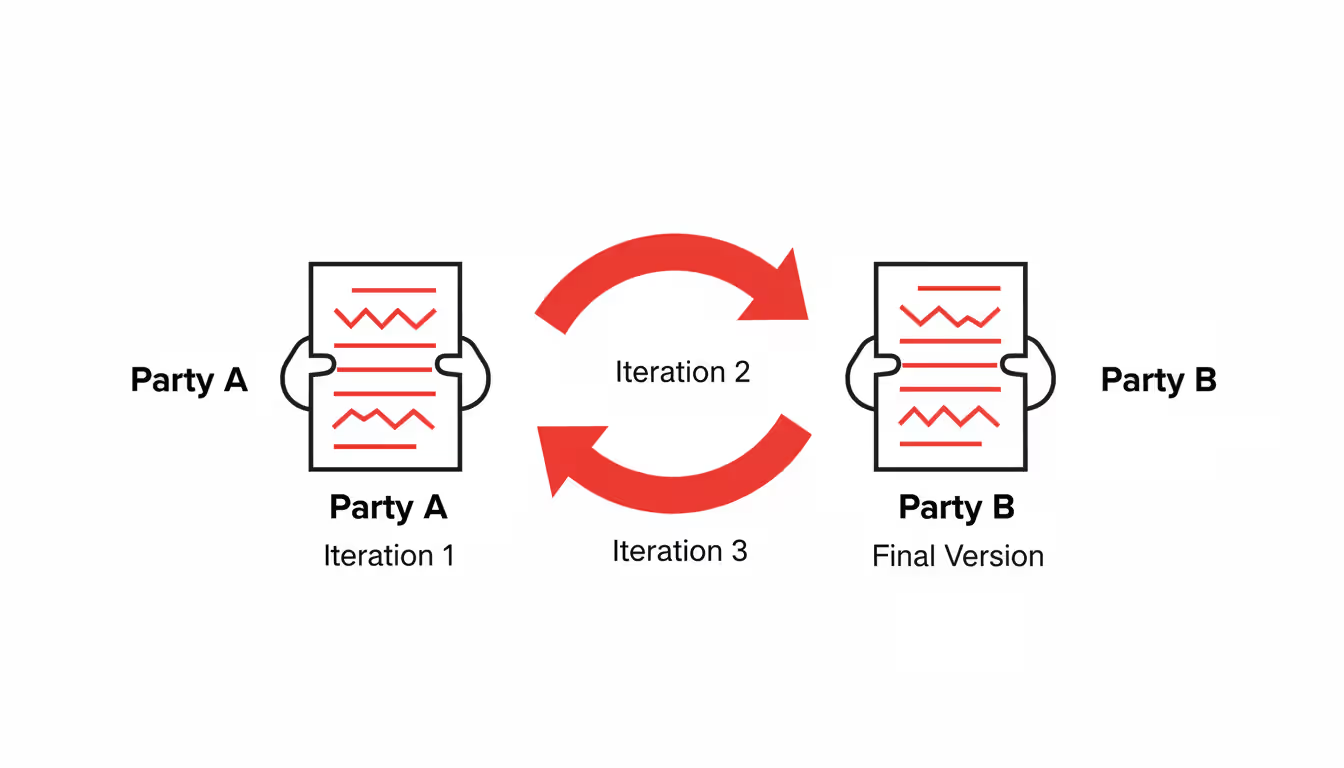
The contract markup process typically follows a predictable sequence. One party—usually the buyer in commercial transactions or the party with more leverage—sends an initial draft. The counterparty reviews this draft, makes changes, and returns a redlined version showing their proposed modifications.
The first party then reviews the redline, accepting some changes and rejecting others. They might propose alternative language for contentious provisions. This creates a second redline, which goes back to the counterparty. The cycle continues until both sides reach agreement or determine that their positions are too far apart.
Here's where process discipline matters. Each redline should compare against the previous agreed version, not against an earlier draft. If Party A sends Draft 1, Party B returns a redline against Draft 1. When Party A responds, they should redline against Party B's version—not against their original Draft 1. Breaking this chain creates confusion about what changes are actually being proposed.
Author: Andrew Bellamy;
Source: craftydeb.com
Version control becomes critical by the third or fourth round. File names like "MSA_v3_Acme_redline_2026-03-15.docx" help everyone track which document they're reviewing. Some legal teams use more elaborate naming conventions that include party initials and round numbers.
Track Changes vs. Manual Redlining Methods
Track changes in contracts using Microsoft Word's built-in feature remains the dominant approach in 2026. When enabled, Word automatically marks deletions with strikethrough and additions with underline and color. The software tracks who made each change and when, which proves valuable in complex negotiations involving multiple reviewers.
The main advantage of track changes is automation. You simply edit the document normally, and Word handles the markup. The "Compare Documents" feature can generate a redline between any two versions, useful when someone forgets to turn on tracking or when you receive a clean version and need to identify changes.
However, track changes has limitations. The markup can become visually cluttered in heavily edited documents, making them hard to read. Some attorneys prefer to manually create redlines by applying formatting themselves—strikethrough for deletions, red text for additions. This gives them precise control over appearance.
PDF redlining presents different challenges. While Adobe Acrobat and similar tools offer markup capabilities, they're less standardized than Word's approach. Some reviewers use comment boxes to suggest changes rather than editing text directly, which creates a two-step process: reading the comment, then mentally visualizing the proposed change.
Common Tools and Software for Redlining
Microsoft Word dominates contract redlining, but specialized legal software has gained ground. Platforms like Ironclad, DocuSign, and ContractWorks offer built-in redlining features integrated with contract lifecycle management systems. These tools often include version control, approval workflows, and audit trails that standalone word processors lack.
Document comparison utilities such as Draftable and Workshare Compare provide more sophisticated analysis than Word's native comparison. They can identify changes across different file formats and highlight even minor modifications like spacing adjustments that Word might miss.
For teams handling high volumes of contracts, these specialized tools justify their cost through time savings and reduced errors. A procurement department processing 200 vendor agreements annually might find that automated redline generation and side-by-side comparison views cut review time by 30-40%.
Smaller organizations often stick with Word, supplemented by careful file naming and cloud storage with version history. Google Docs offers "suggesting mode," which functions similarly to track changes, though legal professionals have been slower to adopt it due to concerns about data security and formatting consistency.
Redline vs Blackline Contracts Explained
The terms "redline" and "blackline" both describe contract markup formats, but they're not interchangeable. Understanding the distinction prevents confusion during negotiations.
A redline shows all changes in color (traditionally red): deletions appear as strikethrough text, and additions appear as colored text. This format makes the markup highly visible and easy to spot when scrolling through a long document.
A blackline uses black text for all changes, relying on strikethrough and underline to distinguish modifications rather than color. Additions appear as black underlined text; deletions show as black strikethrough. Some blackline formats omit deleted text entirely, showing only additions as underlined.
The visual difference matters for readability. Redlines draw the eye immediately to changed sections, which helps during initial review. Blacklines create a cleaner appearance that some find easier to read in detail, particularly in documents with extensive changes where red markup might overwhelm the page.
Feature
Redline
Blackline
Shows deletions
Yes, as colored strikethrough
Yes, as black strikethrough (or hidden)
Shows additions
Yes, in contrasting color (often red)
Yes, as black underlined text
Visual format
High contrast, colorful
Monochrome, subtle
Best used when
Reviewing initial changes, highlighting modifications for approval
Final review before execution, creating clean record of negotiated terms
Software compatibility
Universal in modern word processors
May require specific settings or manual formatting
Readability
Easy to spot changes quickly
Better for reading modified contract as coherent whole
When to use each format depends on your audience and stage of negotiation. Redlines work well for internal reviews and active negotiation rounds where you want changes to stand out. Blacklines suit final approval processes where executives need to read the contract as it will appear when executed, while still seeing what changed.
Some organizations request a blackline before signature as a final verification step, comparing it against the original proposal to confirm no unauthorized changes slipped in. This catches errors where someone accepted all changes in Word without carefully reviewing each one.
How to Redline Contracts Effectively
Effective redlining requires more than knowing how to activate track changes. Professional contract markup follows conventions that make documents clearer and negotiations smoother.
First, redline only substantive changes. Don't mark up minor formatting adjustments, spacing corrections, or typo fixes unless they affect meaning. A contract covered in red markup for trivial changes obscures the important modifications and wastes the counterparty's time. If you must fix formatting, do it in a clean version after both parties agree on substantive terms.
Author: Andrew Bellamy;
Source: craftydeb.com
Second, be precise about what you're changing. If you want to modify a deadline from "30 days" to "45 days," delete "30" and add "45"—don't delete the entire sentence and rewrite it. Surgical edits make your intent clear and give the other party less to object to. Rewriting whole paragraphs suggests you're changing more than the specific point you claim to address.
Third, use comments strategically. Word's comment feature lets you explain why you're making a change or ask questions about unclear language. A comment like "Revised to match insurance requirements in Section 8" helps the reviewer understand your reasoning. However, don't overuse comments—if every change needs explanation, you're probably proposing too many modifications at once.
Fourth, maintain consistent formatting. If the original contract uses "shall" for obligations, continue using "shall" in your additions rather than switching to "will" or "must." Match capitalization, numbering style, and defined term formatting. Consistency signals professionalism and makes the document easier to parse.
Fifth, avoid making changes to provisions you've already agreed to. If Section 3 was settled in the previous round, don't reopen it unless circumstances have genuinely changed. Relitigating agreed points frustrates counterparties and can derail negotiations.
Clear, disciplined redlining practices can reduce contract negotiation cycles by up to 50%.When both parties follow consistent markup standards and focus on substantive issues rather than stylistic preferences, deals close faster and with fewer misunderstandings
— Michael Chen
Contract Review Redlines in Negotiation
Contract negotiation redlines serve as the primary communication tool between parties. Each redlined version represents a proposal: "Here's what we need to make this deal work."
The negotiation dance typically starts with one party sending a form agreement—their ideal terms. The counterparty redlines it, pushing back on unfavorable provisions. The first party then faces a choice with each change: accept it, reject it, or propose compromise language.
Responding to counterparty redlines requires judgment. Accepting all changes to close the deal quickly might leave you with unfavorable terms. Rejecting everything signals you're not negotiating in good faith. The skill lies in identifying which provisions matter most to your interests and which are reasonable compromises.
Author: Andrew Bellamy;
Source: craftydeb.com
Priority classification helps. Before reviewing a counterparty's redline, list your must-haves (deal-breakers), important preferences (worth fighting for), and minor preferences (accept if they push back). When you see their changes, assess each against these categories. Accept changes that don't affect your must-haves. Reject changes that violate them. Negotiate everything in between.
Some negotiators use the redline itself strategically. They'll accept numerous minor changes from the counterparty while holding firm on two or three critical provisions. This creates momentum toward agreement and makes their firmness on key points seem reasonable rather than obstinate.
Counter-proposals work best when you explain the underlying interest. Instead of just changing "Vendor shall indemnify Client for all claims" to "Vendor shall indemnify Client for claims arising from Vendor's negligence," add a comment: "Unlimited indemnification exceeds our insurance coverage. This revision covers your legitimate concerns while remaining insurable."
The number of redline rounds varies by deal complexity and relationship dynamics. Simple agreements might settle in one or two rounds. Complex transactions can run five to seven rounds. Beyond that, diminishing returns set in—you're probably negotiating against someone who lacks authority to compromise, or there's a fundamental mismatch in expectations.
Common Mistakes When Redlining Legal Documents
Even experienced professionals make redlining errors that complicate negotiations or create legal risk.
The most frequent mistake is accepting all changes without careful review. Word's "Accept All Changes" button is dangerous. Someone might have made a change you didn't notice, or auto-correct might have altered a critical term. Always review each change individually before accepting.
Version confusion ranks second. You receive "Contract_v3_final.docx" from the counterparty, make changes, and send back "Contract_v4.docx"—but you edited against v2, not v3. Now your redline shows changes they never proposed. Prevent this by immediately comparing any received version against your last version to confirm you're seeing all their changes.
Incomplete change tracking causes problems when someone edits a contract with track changes turned off, then turns it on for later edits. The document shows recent changes but hides earlier modifications. The counterparty can't tell what changed. Always turn on tracking before opening a contract for review, or use document comparison to generate a complete redline.
Inconsistent defined terms create ambiguity. If the original contract defines "Services" with a capital S, don't add provisions using "services" in lowercase. Word's search function is case-sensitive, so lowercase usage might not be interpreted as referencing the defined term.
Author: Andrew Bellamy;
Source: craftydeb.com
Over-redlining defeats the purpose. If your markup changes 70% of the contract, you're essentially proposing a new agreement. The counterparty might as well start from their own form. When you need extensive changes, consider sending a clean draft with a cover note explaining that your revisions were too substantial for redlining to be useful.
Failing to remove metadata and comments before sending a final version is embarrassing and potentially harmful. That internal comment saying "They'll never agree to this but let's try" shouldn't go to the counterparty. Word's Document Inspector can strip out hidden data before you send the file.
Redlining in the wrong direction confuses everyone. If you're Party B responding to Party A's draft, your redline should show changes to Party A's version. Don't redline against your own internal draft—the counterparty won't understand what you're proposing.
Frequently Asked Questions About Contract Redlines
What does redlining a contract mean?
Redlining a contract means marking up a document to show proposed changes, with deletions typically appearing as strikethrough text and additions in a contrasting color. The term comes from the traditional practice of using red ink to mark changes on paper contracts. Today, most redlining happens electronically using word processor features that automatically track edits.
Is redlining the same as track changes in Word?
Redlining and track changes refer to the same concept, though track changes is Microsoft Word's specific feature name. Other software uses different terms—Google Docs calls it "suggesting mode," while some legal platforms call it "markup" or "comparison view." The core function is identical: visually showing what text was added, deleted, or modified.
Who typically sends the first redline in a contract negotiation?
The party with less leverage usually sends the first redline. In vendor-customer relationships, the vendor typically receives the customer's form agreement and redlines it with requested changes. In employment contexts, the candidate redlines the company's offer letter. However, this isn't universal—sometimes the party with a superior form agreement sends it first, and the counterparty redlines from there.
Can you redline a PDF contract?
Yes, but with limitations. Adobe Acrobat and similar PDF editors offer markup tools that let you cross out text and add comments with proposed language. However, PDF redlining is less standardized and harder to work with than Word's track changes. Many legal professionals convert PDFs to Word, make changes with track changes enabled, then convert back to PDF if needed. Some contract management platforms can compare two PDF versions and generate a redline showing differences.
What's the difference between redline and blackline versions?
Redlines use color (traditionally red) to mark changes, making modifications immediately visible. Blacklines use only black text with strikethrough and underline to indicate changes, creating a more subtle, monochrome appearance. Redlines are better for initial review and active negotiation; blacklines work well for final approval where readers need to see the modified contract as a coherent whole while still identifying what changed.
How many rounds of redlines are normal in contract negotiation?
Simple agreements often settle in one to three rounds of redlines. Moderately complex contracts typically require three to five rounds. Major transactions might run five to seven rounds. Beyond seven or eight rounds, you're likely facing a fundamental disagreement that redlining won't resolve—it's time for a phone call or meeting to address underlying concerns. Each industry has its own norms; enterprise software contracts tend to have more rounds than residential real estate agreements.
Mastering contract redlines transforms how you negotiate agreements. The visual clarity of marked-up changes prevents misunderstandings, creates accountability, and speeds up the back-and-forth process that turns proposals into executed contracts.
Success with redlining comes down to discipline: track every change, maintain version control, focus on substantive modifications, and follow consistent formatting conventions. Whether you're using Word's track changes or specialized contract software, the principles remain the same—make your proposed changes clear, explain your reasoning when helpful, and respect the negotiation process by not relitigating settled points.
The difference between effective and ineffective redlining often determines whether a deal closes in two weeks or two months. Small practices like precise surgical edits, strategic use of comments, and proper version naming compound into major time savings across multiple negotiations. For legal professionals and business teams alike, treating redlining as a core skill rather than a mere technical function pays dividends in faster deals, better terms, and stronger counterparty relationships.
An LLC operating agreement is a legally binding document that outlines ownership structure, management procedures, and operational rules. While only some states require it, this internal document strengthens liability protection, prevents disputes, and satisfies banks and investors
Master Service Agreements establish reusable legal frameworks for ongoing vendor relationships. Discover how MSAs work, essential clauses, negotiation strategies, and when to use master agreements versus individual contracts for your business needs
A transition services agreement (TSA) is a contract where the seller provides operational services to the buyer post-closing. This guide covers TSA fundamentals, contract terms, duration, negotiation strategies, and post-merger management for successful M&A transitions
A side letter is a separate agreement that modifies or supplements a main contract, commonly used in private equity and investment funds. This guide explains side letter provisions, enforceability, negotiation tactics, and how they differ from primary agreements
The content on this website is provided for general informational and educational purposes only. It is intended to explain concepts related to business and corporate law, contracts, compliance, disputes, M&A, and taxation for companies.
All information on this website, including articles, guides, and examples, is presented for general educational purposes. Legal outcomes may vary depending on jurisdiction, company structure, and individual circumstances.
This website does not provide legal advice, and the information presented should not be used as a substitute for consultation with qualified corporate attorneys or legal professionals.
The website and its authors are not responsible for any errors or omissions, or for any outcomes resulting from decisions made based on the information provided on this website.